
Benchmark Email Free Plan Review: Quick Setup, Inbox Delivery
Tested on the free plan · November 2026
We signed up for Benchmark Email with a Google account, built an email from one of its templates and sent ourselves a test. Short answer: setup took one screen, Benchmark gave us a sending address on its own domain, and our test reached the inbox in seconds. The Benchmark logo stays on free emails and forms, and a long template can get cut off in Gmail.
Our verdict
Good fit for: a small business that wants a simple, guided email builder and a free sending address that reaches the inbox.
You'll outgrow it when: your list passes the free contact cap, or you want the Benchmark logo off your emails and forms.
What we built
We used "Continue with Google", filled in one short profile screen, and started an email from a template. We set a subject, a sender name and the required footer address, then sent a test to our own inbox. A new account starts with no contacts, so we used Benchmark's test send rather than a full campaign. Every point below comes from our test notes and screenshots.
Setup: one screen
Benchmark asked for our name, company name, language and date format. That's it: no phone check, no business survey, no address at sign-up. The dashboard then showed a three-step checklist: set up your brand kit, design your first email, and bring in contacts.
A sending address that works
When we set up the sender, Benchmark had already filled in an address on its own sending domain, with our Gmail address as the reply-to. It added a note that a personal reply-to address can hurt delivery and suggested a business domain.
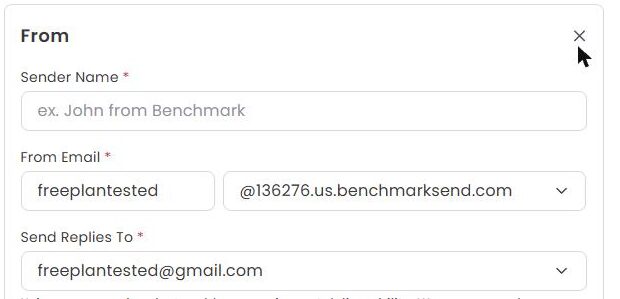
That setup matters. Tools that sent as our Gmail address, like AWeber and GetResponse, landed in spam in our tests. Tools that used their own sending domain reached the inbox.
What's included free
| Feature | Free plan | Notes from our test |
|---|---|---|
| Email builder and templates | Included free | Templates, blank layouts and custom HTML |
| Sending address on Benchmark's domain | Included free | Pre-filled for us, with replies to our inbox |
| Test sends | Included free | To your reply-to address or account users |
| Removing the Benchmark logo | Paid only | Greyed out on free, with an upgrade note |
| Sign-up forms, automations | Not tested | Benchmark says every feature is on every plan; we'll check |
Where our test landed
Our test email reached the Gmail inbox less than a minute after we sent it.
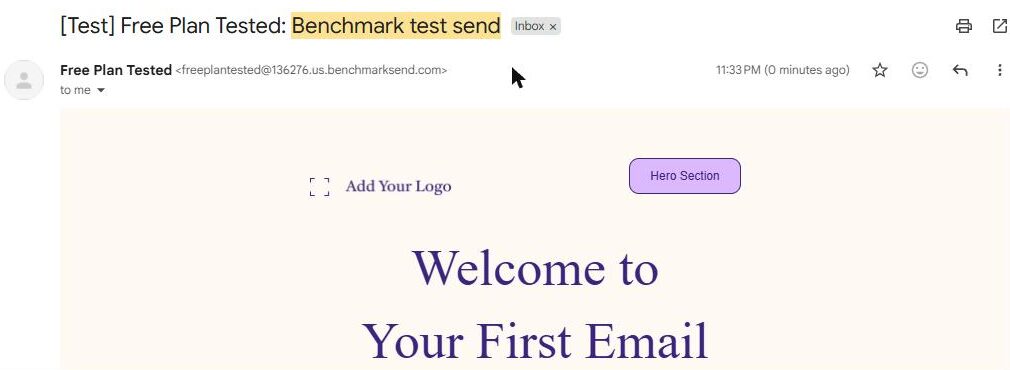
One thing to watch: the starter template is long, and Gmail cut it off with "Message clipped". When Gmail clips an email, readers have to click to see the rest, including your footer and unsubscribe link. Keep your emails short, or trim the template before you send.
A test send isn't a full campaign, and inbox results vary. We'll send a real campaign to a list in our re-test.
The footer and the logo
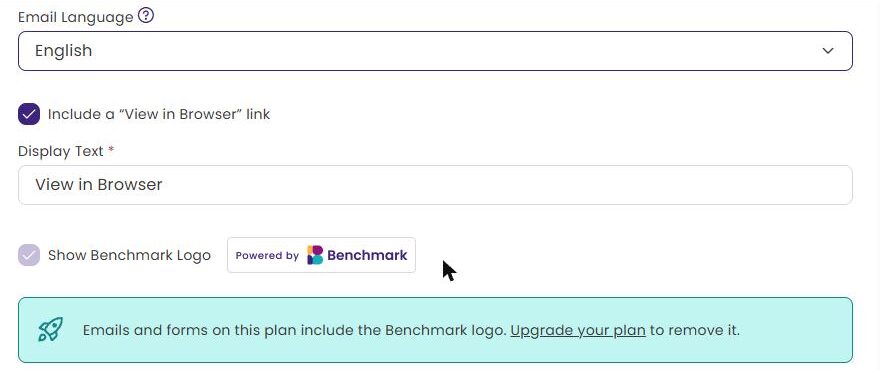
Before you can send, Benchmark requires your business name and address in the footer. The footer settings also show a "Show Benchmark Logo" box that's ticked and locked on free. Benchmark says emails and forms on the free plan include its logo, and you need a paid plan to remove it.
Where the paywall hits
Branding. The Benchmark logo stays on free emails and forms.
Limits. The free plan caps your contacts and monthly sends. Check Benchmark's pricing page for the current limits.
What we liked
- One-screen setup with Google sign-in
- A sending address on Benchmark's domain, filled in for us
- Our test reached the inbox in seconds
- A clear checklist that won't let you send without a footer address
What held us back
- The Benchmark logo on every free email and form
- The long starter template got clipped in Gmail
- A new account has no list, so your first send needs contacts first
Benchmark free plan vs. the alternatives
Like Brevo and MailerLite, Benchmark sends from its own domain and reached our inbox. Brevo needed a phone check first; Benchmark didn't. All three put their own badge or logo on free emails, so compare the limits on each review before you pick.
Should you upgrade?
Stay on free if your list is small and the logo doesn't bother you.
Think about upgrading if your list outgrows the free caps or you want the logo gone. Current prices are on Benchmark's pricing page.
Ready to try Benchmark Email? A small business that wants a simple, guided email builder.
Try Benchmark Email free