
Is Substack Free? We Tested It: Easy Start, Watch Your Name
Tested on the free plan · November 2026
We signed up for Substack, imported one test reader and published a welcome post. Short answer: yes, Substack is free to publish on. There are no paid tiers for writers; Substack takes a cut only if you charge readers. Our post reached the inbox within a minute. The catch we found: Substack filled in our name from our Google profile, everywhere readers can see it. Check that before your first post goes out.
Our verdict
Good fit for: a writer who wants to publish posts and send them by email for free, with no setup work and no mailing address in the footer.
Not a fit for: a business that wants its own brand front and center, automations, or control over its email list's design.
What we built
We signed up with our email, picked a free substack.com address, skipped importing a list, and added one test reader by hand. Then we wrote a short welcome post and published it. Every point below comes from our test notes and screenshots.
The quickest setup on our list
Substack asked almost nothing: an email, a web address and some optional topics. No business questions, no mailing address, no plan to pick. A few minutes later we had a live publication.
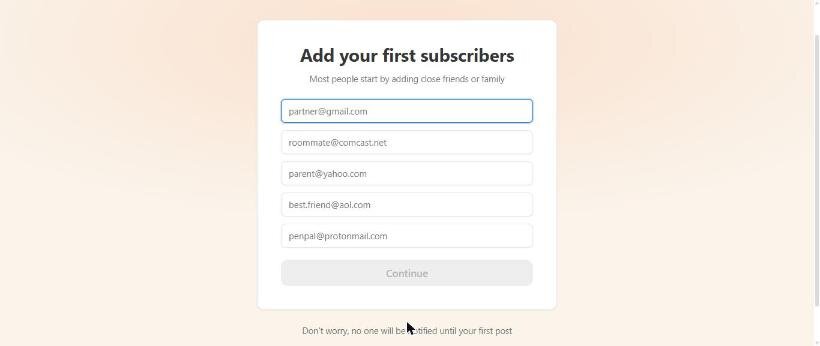
Its setup screen suggests adding "close friends or family" as your first subscribers. Only add people who've agreed to hear from you. When we did import a reader, Substack told them in the first email that their address had been imported, with a one-click unsubscribe. That's a fair warning to readers.
The catch: check your name
Substack named our publication after the first name on our Google profile, in the form "Alex's Substack". The email sender name and the author name also used the profile name. The copyright line at the bottom of every email did too.
If you're starting a brand, change all four in Settings: publication name, email sender name, your profile name and the copyright owner. We had to confirm our email address before Substack let us edit the profile.
What's included free
| Feature | Free | Notes from our test |
|---|---|---|
| Publishing posts and sending by email | Included free | One click posts to the site and emails readers |
| A free substack.com web address | Included free | Ours was freeplantested.substack.com |
| Importing a list | Included free | CSV, spreadsheet or text; readers are told |
| Comments, tags, subscribe buttons | Included free | Set per post |
| Paid subscriptions | Revenue share | Free to turn on; Substack takes a cut of what you earn |
| Automations, list design control | Not offered | We found no automation or segment tools |
| Custom domain, podcasts | Not tested | On our list for the re-test |
Where our post landed
Our welcome post reached the Gmail inbox within a minute, from our publication's substack.com address. Both copies arrived: the one to us as the author and the one to our imported test reader.
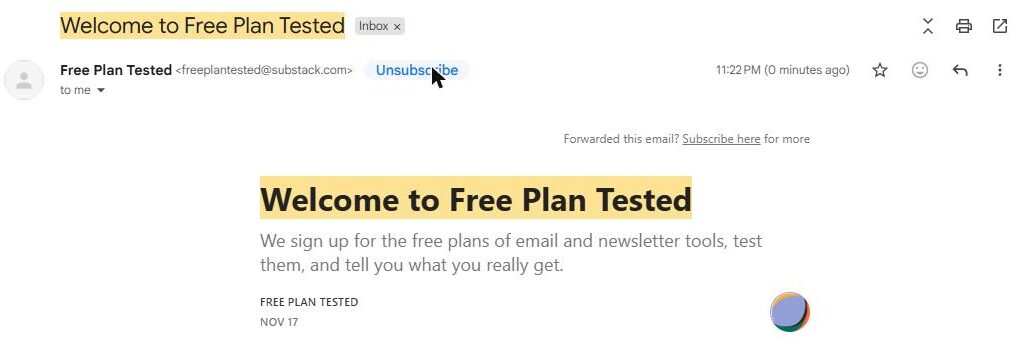
Two more things we noticed in the email. The footer used Substack's own business address, not ours, so you don't need a mailing address to send. And instead of a "Powered by" badge, the email carried Substack's app buttons: read in the app, like, comment and restack. Readers are nudged toward Substack's app and network.
Settings worth changing
- Email confirmation is off by default. In Settings, "Require email address confirmation" was switched off. Turn it on if you want readers to confirm before they're added.
- Your name is everywhere. Change the publication, sender, profile and copyright names if you're publishing as a brand.
What we liked
- Free to publish, with no plan limits we ran into
- The fastest setup we've tested
- Our post reached the inbox in under a minute
- No mailing address needed in your emails
- Imported readers are told and can unsubscribe in one click
What held us back
- It filled in our personal name in four public places
- Email confirmation for new readers is off by default
- No automations, not even a custom welcome series
- Readers are pulled toward Substack's app and network
Substack vs. the alternatives
beehiiv's free plan is the closest match for writers, with a welcome email and more growth tools, but more setup. Buttondown was nearly as quick, also reached the inbox, and keeps readers on your newsletter rather than an app. If you want your brand, not a platform, to be what readers remember, those two are worth a look.
Should you pay?
There's no paid plan for writers to upgrade to. If you turn on paid subscriptions, Substack keeps a share of what readers pay; check Substack's pricing for the current terms. You'd stay on free for everything else.
Ready to try Substack? A writer who wants to publish posts and email them for free with no setup work.
Try Substack free