
Klaviyo vs Omnisend: Which Free Plan Is Better for Stores?
Both tested on the free plan · November 2026
Klaviyo and Omnisend are both built for online stores, and both have a free plan. We set up a fresh account on each, added a test contact and sent one campaign to a Gmail inbox. Both landed in spam. Short answer: neither free plan is a good place to send your first newsletter from a Gmail address. Pick the one that fits your store, and connect your own domain before you send to customers.
Quick answer
Pick Klaviyo if you want the bigger toolkit to grow into, and you're happy to work through a busy dashboard.
Pick Omnisend if you want a simpler, store-first setup and don't mind giving a phone number to finish signing up.
Side by side, on the free plans
| Klaviyo | Omnisend | |
|---|---|---|
| Where our test email landed | Gmail spam | Gmail spam |
| Sender when using a Gmail address | Our Gmail, sent "via" Klaviyo's shared domain | Locked to Omnisend's shared sending address |
| Gmail's reason | Looked like messages marked as spam before | Earlier mail from Omnisend's shared domain was marked as spam |
| Phone number needed | No | Yes, verified by text to finish setup |
| Business address required | Yes | Yes |
| Starts on a paid-feature trial | No, but paid plans are suggested after setup | No |
| Setup extras | Text, social and WhatsApp channels were pre-selected | Asks you to connect your store |
| Branding on free emails | "Powered by Klaviyo" badge | "Powered by Omnisend" |
| Automations, forms, text messages | Not tested | Not tested |
Setting up the same project on both
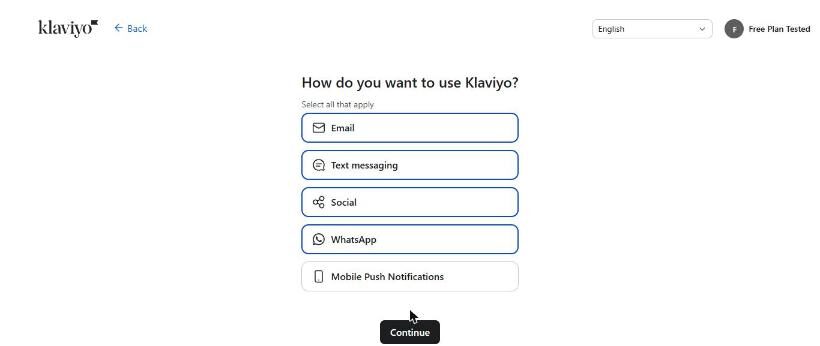
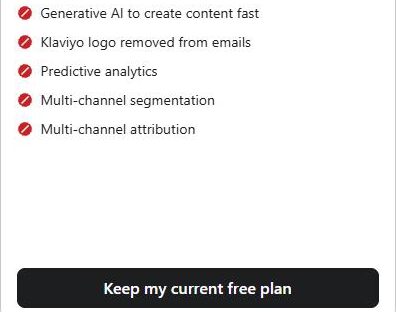
Klaviyo asked what we sell, our business type, our store platform and our business address. It warned that sending from a Gmail address can hurt delivery. Then it asked how we want to use Klaviyo, with email, text messages, social and WhatsApp already ticked. We unticked everything but email. A pop-up suggested two paid plans, with "Keep my current free plan" at the bottom.
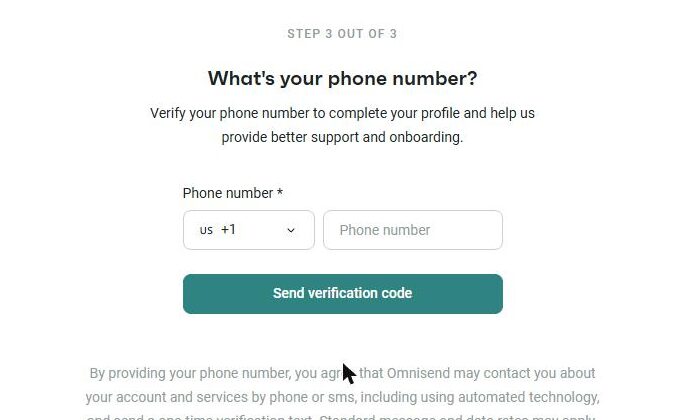
Omnisend made us confirm our email, then took three setup steps: our details, a business address and a phone number. The phone number was required and checked with a text code. The dashboard opened on "Connect your store", with a banner nagging us to turn on two-step login.
Building a campaign was easier on Omnisend. Five clear steps took us from settings to send, and a "Text only" template let us write our own short email. Klaviyo's campaign builder opened with AI ideas and a big template library, and its dashboard had a lot going on at once.
Where each one makes you upgrade
Klaviyo's free plan list showed generative AI, predictive analytics and removing the Klaviyo logo as paid. Its free plan has small caps on profiles and monthly sends, and email support is limited.
Omnisend puts "Powered by Omnisend" in free emails, and sends from its shared address until you connect your own domain.
We don't print limits or prices because both companies change them. Check each tool's pricing page for the current numbers.
Deliverability: both landed in spam
This is the big one. Klaviyo sent our test "via" its shared sending domain. Nothing showed up in the inbox, and the next morning we found it in spam. Gmail said it looked like messages marked as spam before. We had sent a stock template almost unchanged, which may not have helped.
Omnisend's arrived within about a minute, also in spam. We wrote our own short text this time. Gmail's reason pointed at Omnisend's shared sending domain: earlier mail from it had been marked as spam.
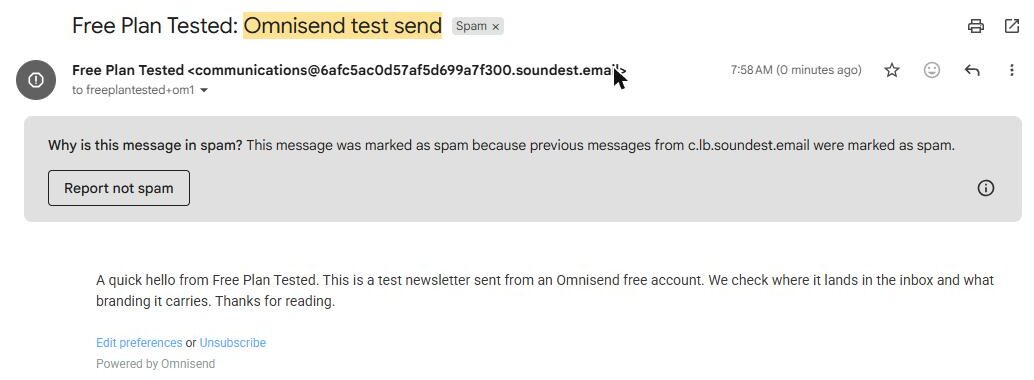
The lesson is the same for both: shared sending addresses carry other people's reputation. Connect your own domain before you email customers. See our spam test for how every free plan did.
Which one fits your situation?
You run a growing store and want room to grow. Klaviyo. Its toolkit is bigger, with flows, forms, reviews and a help desk in the menu. Expect a busy screen and lots of upsells.
You run a small store and want to get going quickly. Omnisend. Setup was focused, and building a campaign was simple. Be ready to verify a phone number.
You don't sell products. Neither. Both are built around stores. A newsletter tool from the inbox side of our test, like MailerLite, fits better.
Our pick for online stores
It's close, and it depends on your store. For a small store that wants simple campaigns, we lean Omnisend: setup was quicker and campaigns were easier to build. For a store that plans to grow into automations and data, Klaviyo has more room. Either way, connect your own domain first.
Read our Klaviyo review and Omnisend review, or line them up in our compare tool.