
Omnisend Free Plan Review: Built for Stores, Spam in Our Test
Tested on the free plan · November 2026
We signed up for Omnisend, finished its setup, added a test reader, and sent a short text-only email to a Gmail inbox. Short answer: Omnisend is made for online stores, and it shows. Setup requires a phone number, free emails carry a "Powered by Omnisend" line, and our test landed in Gmail's spam folder.
Our verdict
Good fit for: an online store, especially on Shopify, that wants email and SMS tools built around products and sales.
Not a fit for: a newsletter writer or a business without a store. Most of Omnisend's screens and templates assume you sell products.
What we built
We created an account with email and a password, confirmed it, finished three setup steps, added one test reader, and sent one campaign with our own short text. Every point below comes from our test notes and screenshots.
Setup: a phone number is required
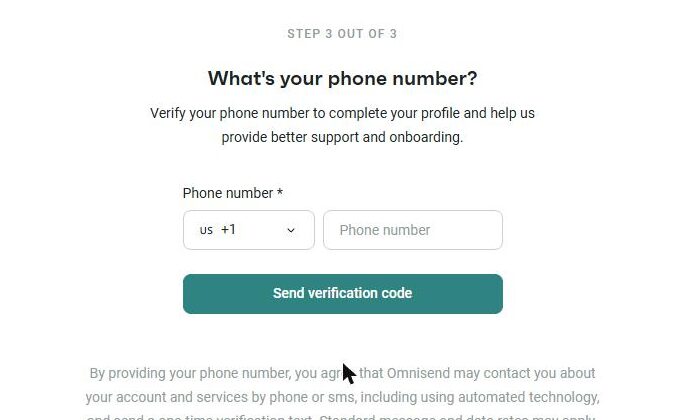
After confirming our email, Omnisend asked for our name and business, then a business address for anti-spam laws. The last step required a phone number and a code sent by text message. There's no way to skip it.
The dashboard then greeted us with "Connect your store." Omnisend calls itself a marketing tool "tailored for ecommerce businesses," and the menus, templates and tips all point that way.
Building and sending
Adding a reader by hand needs a tick confirming that person gave permission. That's a good reminder.
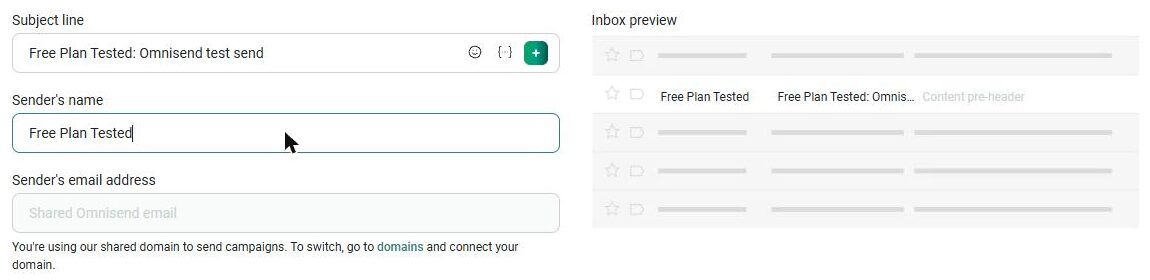
On the campaign's settings page, the sender address was locked to a shared Omnisend address. To send from your own address, you connect your own domain.
The template library is full of store-style designs, such as sale and holiday promotions. We found a "Text only" template, replaced its text with ours, and sent it to all subscribers. Omnisend also offers a "campaign booster" that re-sends to people who didn't open.
Where it landed: spam
Our test arrived within about a minute, in Gmail's spam folder. Gmail's reason was specific: earlier messages from Omnisend's shared sending domain had been marked as spam. In other words, other senders on the same shared domain affected our result.
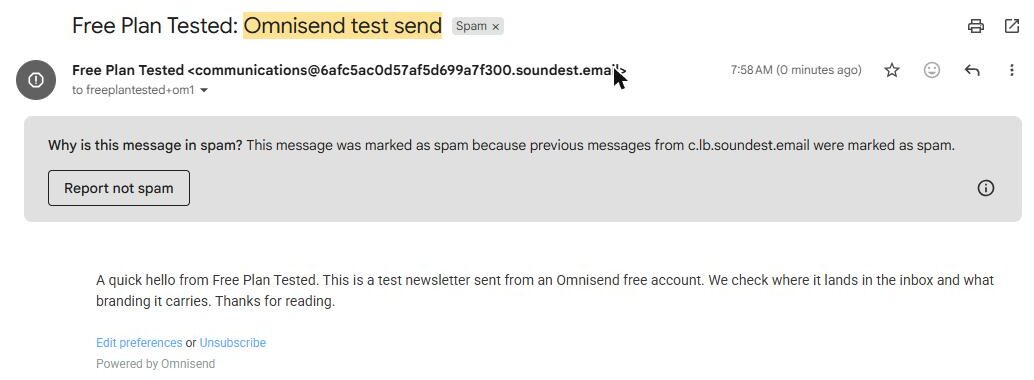
The footer had links to edit preferences or unsubscribe, and "Powered by Omnisend." Our mailing address didn't appear in this text-only email, so check your footer before you send.
What's included free
| Feature | Free plan | Notes |
|---|---|---|
| Email campaigns and templates | Included free | Tested: sent one text-only campaign |
| Inbox placement | Spam in our test | Tested: one send, landed in Gmail spam |
| Sending from your own address | Needs your domain | Tested: shared Omnisend domain by default |
| Removing "Powered by Omnisend" | Paid only | Tested: shown in the footer |
| Automations, forms and SMS | Not tested | Store-focused features we didn't test |
The free plan also caps your contacts and sends. Current limits are on Omnisend's pricing page.
What we liked
- A clear permission check when you add readers
- A plain text-only template option
- Strong features for online stores
What held us back
- Our test landed in spam because of the shared domain
- A phone number is required to finish setup
- Store-first screens if you don't sell products
Omnisend free plan vs. the alternatives
For an online store, Klaviyo is the closest match, though our test there also landed in spam. If you don't run a store, Mailchimp, Buttondown and Brevo all reached our inbox.
Should you upgrade?
Upgrade if your store needs more contacts, more sends, or no Omnisend branding. Upgrading won't fix spam placement on its own. Connecting your own domain is the bigger fix. Current prices are on Omnisend's pricing page.
Ready to try Omnisend? An online store, especially on Shopify, that wants email built around products.
Try Omnisend free