
Klaviyo Free Plan Review: Powerful, Busy, and Spam
Tested on the free plan · November 2026
We signed up for Klaviyo with a Google login, finished its setup, and sent a test campaign to a Gmail inbox. Short answer: Klaviyo is a big, powerful tool built mainly for online stores. The free plan works, but it carries the Klaviyo logo, leaves out the AI tools, and our test email landed in Gmail's spam folder.
Our verdict
Good fit for: an online store, especially on Shopify or WooCommerce, that wants to try Klaviyo before paying.
Not a fit for: a newsletter writer or blogger who wants a simple tool. Klaviyo's screens and templates are aimed at shops.
What we built
We answered Klaviyo's setup questions, kept the free plan, and sent one email campaign to our test list. Every point below comes from our test notes and screenshots.
Setup: lots of questions, and extra channels turned on
Klaviyo asks what your business sells, which store platform you use, and how big your list is. It also requires a business name and physical address for anti-spam laws. On the sender step, it suggested a business email address rather than Gmail, but let us carry on.
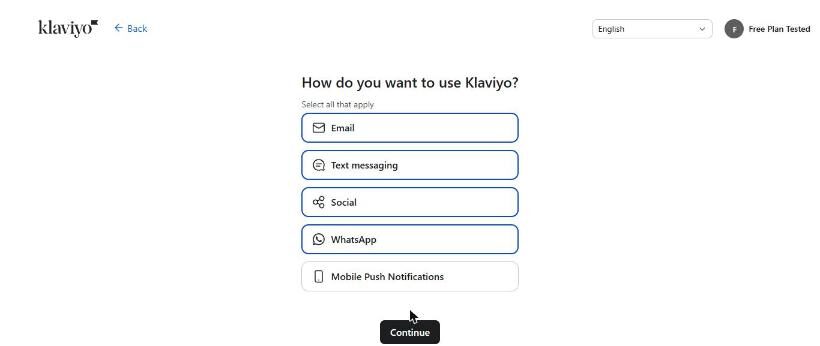
Watch the next screen. Klaviyo had already ticked Email, Text messaging, Social and WhatsApp for us. We unticked everything except Email.
The free plan's limits
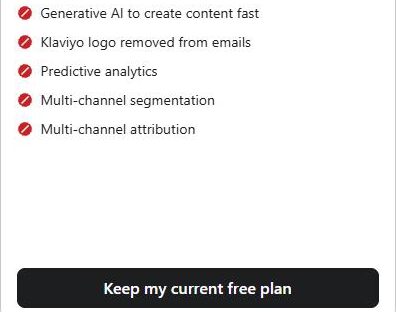
Right after setup, Klaviyo showed its paid plans with "Keep my current free plan" at the bottom. The free column was honest about what's missing: no AI writing help, no logo removal, no predictive analytics, and email support only for your first weeks.
Building and sending a campaign
The dashboard is busy. There's a long sidebar of features, an AI assistant panel open by default, and several upgrade prompts. Creating a campaign offered AI ideas first, then a "set it up yourself" option. Klaviyo's "Smart Sending" setting was on by default; it skips people you emailed recently.
The template library leans hard toward shops and restaurants. We sent one of its stock templates with little change. Our campaign was scheduled for a couple of minutes later, then sent.
Where it landed: spam
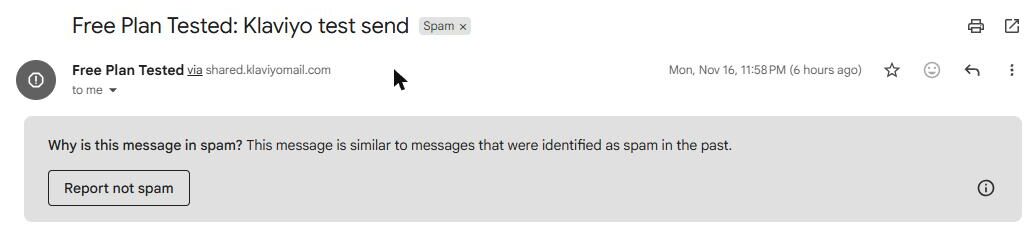
Our test landed in Gmail's spam folder. It came "via shared.klaviyomail.com," Klaviyo's shared sending domain, and Gmail said it looked like messages marked as spam before.
To be fair, we sent a stock template full of sample menu text from a brand-new account with a Gmail sender. Real content and your own sending domain should do better. Klaviyo itself warned us about the Gmail sender. But it's the result we got.
The footer had our unsubscribe line, our mailing address and a "Powered by Klaviyo" badge.

What's included free
| Feature | Free plan | Notes |
|---|---|---|
| Email campaigns and templates | Included free | Tested: sent one campaign from a stock template |
| Inbox placement | Spam in our test | Tested: one send, landed in Gmail spam |
| Removing the Klaviyo logo | Paid only | Tested: "Powered by Klaviyo" in the footer |
| AI writing help | Paid only | Crossed out on the free plan screen |
| Email support | Included free | Only for your first weeks, per the plan screen |
| Flows, forms and text messages | Not tested | We didn't test them |
The free plan also caps how many people you can keep and email each month. Current limits are on Klaviyo's pricing page.
What we liked
- A huge set of features, even on free
- An honest plan screen showing what free leaves out
- A clear warning about Gmail senders
What held us back
- Our test landed in Gmail's spam folder
- Extra channels pre-selected during setup
- A busy dashboard with many upgrade prompts
Klaviyo free plan vs. the alternatives
For a newsletter, Buttondown and Brevo were simpler and reached our inbox. For a small shop, Brevo and MailerLite are worth a look before you commit to Klaviyo.
Should you upgrade?
Upgrade if your store is growing past the free limits, or you want the logo gone and the AI tools. Upgrading won't fix spam placement on its own. Sending from your own domain is the bigger fix. Current prices are on Klaviyo's pricing page.
Ready to try Klaviyo? An online store that wants to try Klaviyo before paying.
Try Klaviyo free