
Mailchimp Free Plan Review: It Hit the Inbox, but Find Free First
Tested on the free plan · November 2026
We signed up for Mailchimp, chose the free plan, added a test reader, and sent a short newsletter to a Gmail inbox. Short answer: it worked. Our email landed in the inbox, sent from Mailchimp's own domain. But Mailchimp works hard to steer you toward a paid trial, and free emails carry a Mailchimp badge.
Our verdict
Good fit for: a beginner with a small list who wants a well-known tool and good inbox placement from a Gmail address.
Not a fit for: anyone who wants a quick, no-upsell setup, needs several users, or wants no tool branding in their emails.
What we built
We created an account, let Mailchimp read our website for brand details, picked the free plan, imported one test reader, and sent one email with our own short text. Every point below comes from our test notes and screenshots.
Sign-up: create the account from the sign-up page
Our first attempt to log in with Google failed because no Mailchimp account existed yet. Start from the sign-up page, not the login page.
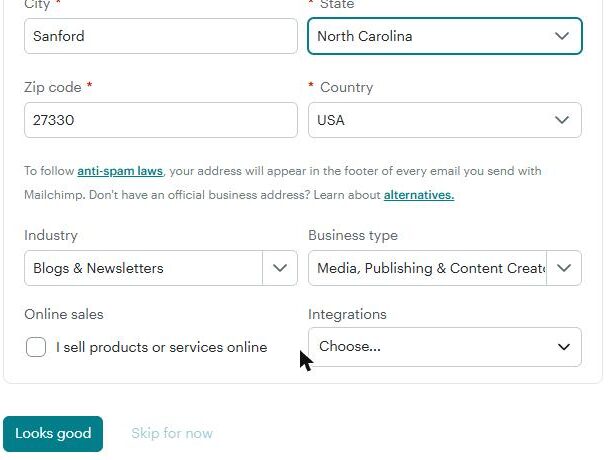
Setup asks for your name, business name and website. Then Mailchimp did something useful: it scanned our website and filled in our industry, colors, fonts and logo. It also guessed our mailing address from our location, which was wrong, so check that field. Your address appears in every email footer.
Finding the free plan
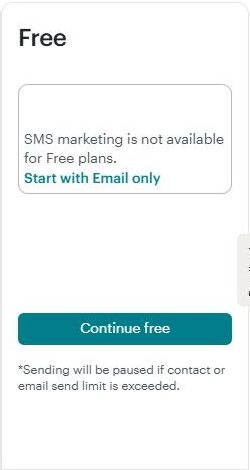
The plan page opens on a paid trial with a payment step. The free plan is the last column, on the far right, with a "Continue free" button. It also warns that sending pauses if you go over the free limits.
After that, a reminder in the sidebar keeps offering a free trial of a paid plan.
Building and sending
Adding one test reader by copy and paste took seven short steps. That's thorough, but slower than most tools we've tested.
When we entered our Gmail address as the sender, Mailchimp said it would send from its own domain instead "to ensure delivery." Replies still come to your address.

The template picker has hundreds of designs, but only some carry a "Free" label. We used a simple free layout, and our logo appeared in it automatically. We replaced all the sample text with our own.
After we hit send, the campaign sat at "Sending" for a few minutes before it went out. New accounts may see a short wait.
Where it landed: the inbox
Both copies of our test reached the Gmail inbox, about six minutes after we sent them. That matches our wider results: tools that send from their own domain, like Buttondown and Brevo, usually reach the inbox.

The footer had our copyright line, mailing address, an unsubscribe link and an "Intuit Mailchimp" badge.

What's included free
| Feature | Free plan | Notes |
|---|---|---|
| Inbox placement | Inbox in our test | Tested: both copies reached the Gmail inbox |
| Sending from a Gmail address | Included free | Tested: sent from Mailchimp's domain instead |
| Brand import from your website | Included free | Tested: logo, colors and industry filled in |
| Templates | Included free | Tested: some are free, others are paid |
| Removing the Mailchimp badge | Paid only | Tested: badge in the footer |
| SMS and more users | Paid only | Plan page: limited users, no SMS on free |
The free plan also caps your contacts and monthly sends. Current limits are on Mailchimp's pricing page.
What we liked
- Our test reached the inbox from a Gmail sender
- It pulled our logo and colors from our website
- Clear warnings about limits and sender addresses
What held us back
- The free plan is hidden behind a paid trial offer
- A seven-step import for a single reader
- Mailchimp badge on free emails, and limited users
Mailchimp free plan vs. the alternatives
MailerLite and Buttondown also reached our inbox, with simpler setups and fewer upsells. Brevo reached the inbox too and is a good fit if you send to a larger list less often.
Should you upgrade?
Upgrade if you outgrow the free limits, need more users, want SMS, or want the Mailchimp badge gone. For inbox placement alone, the free plan did fine in our test. Current prices are on Mailchimp's pricing page.
Ready to try Mailchimp? A beginner with a small list who wants a well-known tool.
Try Mailchimp free