
Mailchimp vs HubSpot: Which Free Email Plan Is Better?
Both tested on the free plan · November 2026
We set up a fresh free account on each, added a contact, wrote our own short email and sent it to a Gmail inbox. Mailchimp's reached the inbox. HubSpot's landed in spam. Short answer: if email is the main job, Mailchimp's free plan is the better tool. HubSpot makes sense when you want a free CRM first and email is one part of it.
Quick answer
Pick Mailchimp if you mainly want to send newsletters and have them reach the inbox.
Pick HubSpot if you want a free CRM to track contacts and deals, and email is a side job.
Side by side, on the free plans
| Mailchimp | HubSpot | |
|---|---|---|
| Where our test email landed | Gmail inbox, after a short wait | Gmail spam, within a minute |
| Sender when using a Gmail address | Rewritten onto Mailchimp's own domain | Rewritten onto a HubSpot free-sending domain |
| Built around | Email marketing | A CRM, with email as one tool |
| Setup | Guided, styled our email from our website | Long, with an AI assistant and many detours |
| Footer address | Required | Required before Send unlocks |
| Branding on free emails | Intuit Mailchimp badge | HubSpot logo up top and a "Send free email today" button |
| Sending limits | Sending pauses if you go over the limits | A monthly send counter with an upgrade link |
| Forms, landing pages, automations | Not tested | Not tested |
Setting up the same project on both
Mailchimp got us to a ready email fast. It scanned our website for our logo, colors and fonts, and its checklist walked us through the campaign. The free plan sat at the end of a page that opens on a paid trial.
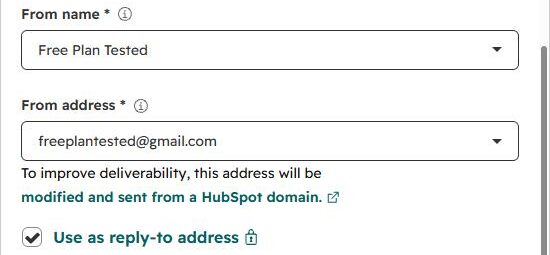
HubSpot took longer to reach email. It asked about our role, company and goals, offered to connect our inbox, opened an AI onboarding chat, and started our contacts list with sample records. It also filled in our name from our Google account as the sender, which we changed. The email editor itself was easy, with drag-and-drop blocks and a guided tour.
Where each one makes you upgrade
Mailchimp's free plan limits how many users and audiences you get, and has no text messages. Some templates and badge removal are paid.
HubSpot's free email shows a monthly send counter with an upgrade link, and the Campaigns menu was locked. The HubSpot branding stays on free emails.

We don't print the numbers because both companies change them. Check each tool's pricing page.
Deliverability: the big difference
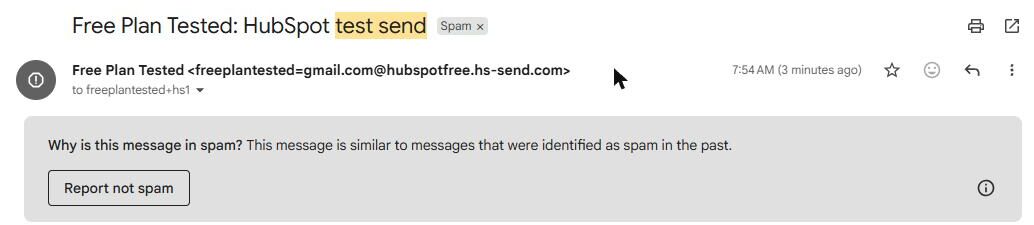
Both tools moved our Gmail sender onto their own domain. Mailchimp held the campaign for a few minutes, then delivered it to the inbox. HubSpot's arrived within a minute, in spam, even though we wrote our own short text. Gmail said it looked like messages marked as spam before.
Also watch the top of HubSpot emails: the "Company logo" spot showed HubSpot's logo, because we hadn't added ours. See our spam test for every result.
Which one fits your situation?
You want a newsletter that reaches people. Mailchimp.
You're a small sales team tracking leads. HubSpot's free CRM is the real draw. Send email from it now and then, and set up your own domain before you rely on it.
Our pick
Mailchimp, for email. It reached the inbox and kept the setup simple. Read our Mailchimp review.
Choose HubSpot if the CRM is what you're after. Read our HubSpot review, or line them up in our compare tool.