
HubSpot Free Email Review: Big Toolkit, Spam Result
Tested on the free plan · November 2026
We signed up for HubSpot, set up its free marketing tools, added a test reader, and sent a short email with our own text to a Gmail inbox. Short answer: HubSpot gives you a lot for free, including a full CRM. But setup is long, every free email carries a HubSpot badge, and our test landed in Gmail's spam folder.
Our verdict
Good fit for: a small business that wants a free CRM first, with email as one part of it.
Not a fit for: a newsletter writer who just wants to send emails that reach the inbox, with no tool branding.
What we built
We created an account, skipped the extras, added one test reader, and sent one email from HubSpot's "Simple" template with our own text. Every point below comes from our test notes and screenshots.
Sign-up: many steps
HubSpot asks for a lot before you reach the email tool. After a verification code, it wanted our role, our website (which it analyzed), our company size and industry. Then it offered to connect our Gmail, and then opened an AI onboarding assistant. We chose "Set up manually," picked a goal, and finally landed on the email page.
HubSpot also took the name from our Google account for the user profile and the email's From name. If you want your business name on your emails, change it in your profile settings and pick it as the From name.
Building and sending
The email editor is drag-and-drop, with text, buttons, images, video and HTML blocks. Before HubSpot let us send, it required a footer address, which anti-spam laws need.
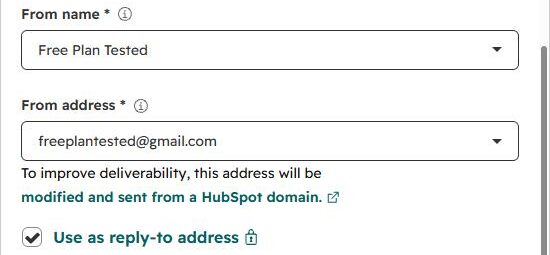
When we entered our Gmail address as the sender, HubSpot said it would send from a HubSpot domain instead "to improve deliverability," with replies still coming to our Gmail.
HubSpot also shows a monthly send counter with an upgrade link, and it skips "unengaged contacts" by default.
Where it landed: spam
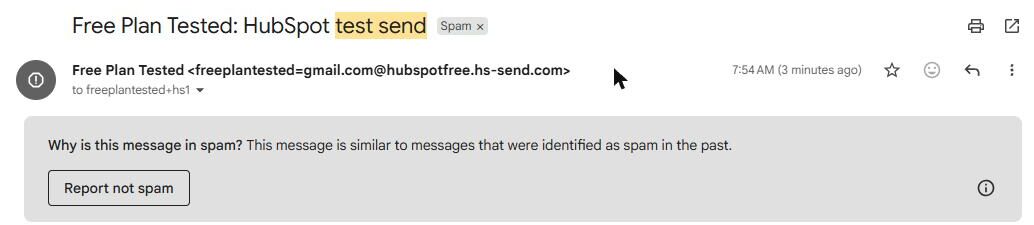
Our test arrived within a minute, in Gmail's spam folder. Gmail said it looked like messages marked as spam before. That's despite our own short text and HubSpot's own sending domain.
The email also showed more HubSpot branding than we expected. The template's "Company logo" placeholder went out as a HubSpot logo, and the footer had a dark "Send free email today" HubSpot button.

One test is one data point. A warmed-up account and your own domain may do better. But it's the result we got.
What's included free
| Feature | Free plan | Notes |
|---|---|---|
| Marketing emails and editor | Included free | Tested: drag-and-drop editor and templates |
| CRM and contacts | Included free | Tested: added a contact |
| Sending from a Gmail address | Included free | Tested: sent from HubSpot's domain instead |
| Inbox placement | Spam in our test | Tested: one send, landed in Gmail spam |
| Removing HubSpot branding | Paid only | Tested: HubSpot badge in the footer |
| Campaigns tool, more sends | Paid only | Shown with upgrade links in the app |
The free tools also cap how many emails you can send each month. Current limits are on HubSpot's pricing page.
Setup notes
- Remove the "Company logo" placeholder or replace it with your own logo, or HubSpot's logo may appear.
- Delete the sample contacts HubSpot adds before you send to "all contacts."
- Add your footer address early. You can't send without it.
What we liked
- A full free CRM alongside email
- A capable drag-and-drop editor
- Clear warning and fix for Gmail senders
What held us back
- Our test landed in Gmail's spam folder
- HubSpot logo and "Send free email today" badge in free emails
- A long setup with many detours
HubSpot free plan vs. the alternatives
If inbox placement matters most, Mailchimp, Buttondown and Brevo all reached our inbox. If you mainly want a free CRM and send email only now and then, HubSpot is still worth a look.
Should you upgrade?
Upgrade if you need more sends, the campaigns tool, or the HubSpot badge gone. Upgrading won't fix spam placement on its own. Sending from your own domain is the bigger fix. Current prices are on HubSpot's pricing page.
Ready to try HubSpot? A small business that wants a free CRM first, with email as one part of it.
Try HubSpot free