
Mailchimp vs Brevo: Which Free Email Plan Is Better?
Both tested on the free plan · November 2026
We set up a fresh free account on each, wrote a short email and sent it to a Gmail inbox. Both landed in the inbox after a few minutes. Short answer: Brevo got us to a sent campaign with less fuss, but it makes you verify a phone number first and limits how much you can send each day. Mailchimp's setup is more polished, but its free plan is tight and the app keeps pointing you to a paid trial.
Quick answer
Pick Brevo if you send occasional newsletters to a modest list and want a plain, checklist-style campaign builder.
Pick Mailchimp if you want a well-known tool with a guided setup that styles your emails from your website.
Side by side, on the free plans
| Mailchimp | Brevo | |
|---|---|---|
| Where our test email landed | Gmail inbox, after a short wait | Gmail inbox, about six minutes after sending |
| Sender when using a Gmail address | Rewritten onto Mailchimp's own domain | Rewritten onto Brevo's own domain |
| Phone number needed | No | Yes, verified by text before your first campaign |
| Business address required | Yes, it pre-filled one from our location | Yes, and it rejected the "#" sign |
| Getting to the free plan | Last column on a page that opens on a paid trial | Straight to the dashboard on the free plan |
| Sending limits | Contact and send limits; sending pauses if you go over | A daily sending allowance |
| A/B tests | A link in the campaign checklist (we didn't run one) | Paid only |
| Landing pages | Not tested | Paid only |
| Branding on free emails | Intuit Mailchimp badge | "Sent with Brevo" badge |
| Users | One seat on free | Not tested |
Setting up the same project on both
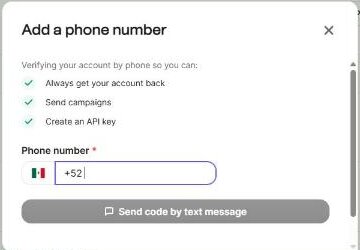
Brevo asked for our name, organization, website and a business address, then dropped us straight onto the dashboard on the free plan. There was no plan page to dodge. The catch came later: when we went to send, Brevo asked us to verify a phone number by text first.
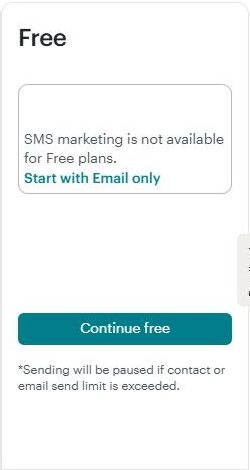
Mailchimp scanned our website and filled in our logo, colors and fonts, which made the first email look on-brand with no work. It also pre-filled a mailing address from our location, which we had to fix. The plan page opened on a paid trial, and the free plan was the last option, under "Continue free".
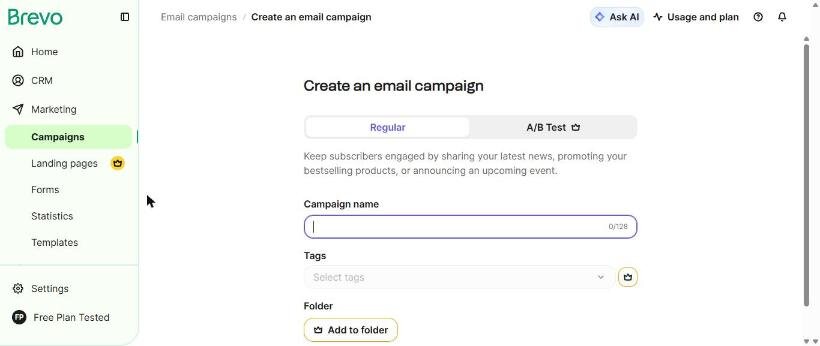
Brevo's campaign builder is a simple checklist: sender, recipients, subject, design. Mailchimp's is similar, with To, From, Subject, Send time and Content. Adding one contact took seven screens on Mailchimp. On Brevo, our own address was already in a starter list.
Where each one makes you upgrade
Brevo marks paid features with a crown. On free, A/B tests, landing pages, best-time sending, sending in batches, tags, folders, WhatsApp and push messages all wore one. Removing the "Sent with Brevo" badge is paid.
Mailchimp's free plan limits how many users and audiences you get, and has no text messages. Some templates are paid, and removing the Mailchimp badge is paid.
We don't print limits or prices because both companies change them. Check Brevo's and Mailchimp's pricing pages for the current numbers.
Deliverability: both reached the inbox
Both tools moved our Gmail sender onto their own sending domain, and both emails landed in Gmail's main inbox. Brevo's arrived about six minutes after sending. Mailchimp's campaign sat at "Sending" for several minutes first, then landed in the inbox. Both are on the inbox side of our spam test.
Which one fits your situation?
You send a newsletter now and then to a modest list. Brevo. The builder is plain and quick, and the daily allowance is fine for small, occasional sends.
You want your emails to look polished with little effort. Mailchimp. Its website scan styled our email for us.
You'd rather not give a phone number. Mailchimp didn't ask for one in our test. Brevo won't send until you do.
You want to test subject lines. Brevo puts A/B tests behind its paywall. Mailchimp offered an A/B test option in the campaign checklist, though we didn't run one.
Our pick
Brevo, by a nose, for small businesses that send occasional newsletters. It skipped the trial upsell, built a campaign quickly and reached the inbox. Read our Brevo review.
Choose Mailchimp instead if you want the familiar name and a setup that styles your emails for you. Our Mailchimp review shows how to find the free option. Or line them up in our compare tool.